最近有一个产品规划,要用到上位机和下位机通信,为了长期演进不成屎山,所以我一开始考虑了各种TLV形式协议,然后突然想起这不protobuf就是最现成的东西.
首先确保你传输程序是正常的,比如用SPI/UART等,比如实现这两个函数,只给签名就明白.
/**
 * Send `size` bytes from `buf` over UART (blocking, polled).
 * Safe to call after USART hardware is initialised and enabled.
 */
void uart_send(const uint8_t *buf, size_t size);

/**
 * Read one byte from the receive ring buffer.
 * Returns 1 on success (byte written to *out), 0 if buffer empty.
 */
int uart_read_byte(uint8_t *out);
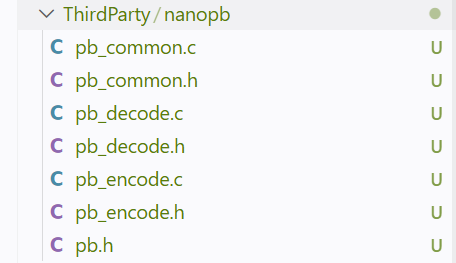
其中适用于MCU的库,我选择这个,把对应源码放到MCU工程内.
https://github.com/nanopb/nanopb

定义一个 chat.proto
syntax = "proto2";

message ChatMsg {
  required uint32 seq = 1;
  required string from = 2;
  required string text = 3;
  optional bool ack = 4 [default = false];
}
再写一个限制,限制最大长度,不过由于pb传输是压缩的,不是每次传输maxsize那么大,只是为了一些协议限制.
ChatMsg.from max_size:16
ChatMsg.text max_size:64
为了简单实现,先考虑实现一个帧头+数据,确定一次性接受完整的一个pb包,我这么准备数据包.
- header[0] = payload_len & 0xFF
- header[1] = (payload_len >> 8) & 0xFF
- payload[N]
N的长度是payload_len指定,这样我只需要多2个字节,就可以指示长度,当然,当前的协议不健壮,不能解决各种粘包问题,但是先解决通信问题.
把proto转换成对应C代码.
protoc \
  --plugin=protoc-gen-nanopb=/usr/bin/protoc-gen-nanopb \
  --nanopb_out="<输出目录>" \
  --nanopb_opt="-f<chat.options路径>" \
  -I "<proto目录>" \
  "<chat.proto路径>"
如果没有对应工具,这样安装.
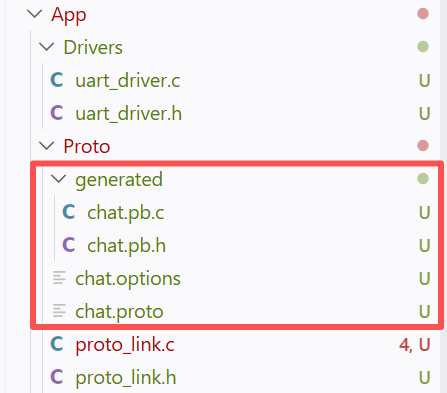
apt-get install -y protobuf-compiler nanopb libnanopb-dev这样得到截图上四个文件,2个写的,2个是生成的.

看生成文件,是发现有发送结构体的
/* Struct definitions */
typedef struct _ChatMsg {
    uint32_t seq;
    char from[16];
    char text[64];
    bool has_ack;
    bool ack;
} ChatMsg;
我们可以写一个发包的函数,proto_send_chat后续实现,实现方法就是加包头发串口,等下实现.
static void proto_send_text(const char *from, const char *text, bool ack, uint32_t seq)
{
    ChatMsg msg = ChatMsg_init_zero;

    msg.seq = seq;
    (void)strncpy(msg.from, from, sizeof(msg.from) - 1U);
    (void)strncpy(msg.text, text, sizeof(msg.text) - 1U);
    msg.has_ack = true;
    msg.ack = ack;

    (void)proto_send_chat(&msg);
}
然后实现到UART的接口,这里注意一些类似固定范式的,ostream申请后,编码信息,最后发送.
static bool proto_send_chat(const ChatMsg *msg)
{
    uint8_t payload[PROTO_MAX_PAYLOAD];
    pb_ostream_t ostream = pb_ostream_from_buffer(payload, sizeof(payload));
    if (!pb_encode(&ostream, ChatMsg_fields, msg)) {
        return false;
    }

    if (ostream.bytes_written > 0xFFFFu) {
        return false;
    }

    uint16_t payload_len = (uint16_t)ostream.bytes_written;
    uint8_t header[PROTO_FRAME_HDR_SIZE] = {
        (uint8_t)(payload_len & 0xFFu),
        (uint8_t)((payload_len >> 8) & 0xFFu)
    };

    uart_send(header, sizeof(header));
    uart_send(payload, payload_len);
    return true;
}
至于回包就是反方向
void proto_link_poll(void)
{
    uint8_t byte = 0U;

    while (uart_read_byte(&byte)) {
        if (g_rx.received_len < PROTO_FRAME_HDR_SIZE) { // 接受头中
            g_rx.header_buf[g_rx.received_len++] = byte;

            if (g_rx.received_len == PROTO_FRAME_HDR_SIZE) {
                g_rx.expected_len = (uint16_t)g_rx.header_buf[0] |
                                    ((uint16_t)g_rx.header_buf[1] << 8);
                if ((g_rx.expected_len == 0U) || (g_rx.expected_len > PROTO_MAX_PAYLOAD)) {
                    proto_reset_rx(); // 不是正常的包,因为我这个协议非常脆,真实自己替换.
                }
            }
            continue; // 跳出当前循环,下面代码不执行(正在接受头)
        }

        // 接受数据
        g_rx.payload_buf[g_rx.received_len - PROTO_FRAME_HDR_SIZE] = byte;
        g_rx.received_len++;

        // 判断收完了没,收完去解码
        if (g_rx.received_len == (uint16_t)(PROTO_FRAME_HDR_SIZE + g_rx.expected_len)) {
            proto_try_decode_frame(g_rx.payload_buf, g_rx.expected_len); // 等下再介绍这个
            proto_reset_rx();
        }
    }
}
正常来说,你应该设计一个简单的包校验,因为我这里是纯演示,就没怎么做.
下面是处理代码
static void proto_handle_message(const ChatMsg *msg)
{
    if (msg->has_ack && msg->ack) {
        return;
    }

    proto_send_text("mcu", "ack from stm32", true, msg->seq);
}

static void proto_try_decode_frame(const uint8_t *payload, uint16_t len)
{
    ChatMsg msg = ChatMsg_init_zero;
    pb_istream_t istream = pb_istream_from_buffer(payload, len);

    if (pb_decode(&istream, ChatMsg_fields, &msg)) {
        proto_handle_message(&msg);
    }
}
另一个单片机或者PC,就同样方法处理,不过当前演示简单,建议实际工程中,要注意自己做包结构,pb只负责解释包有效数据本身.