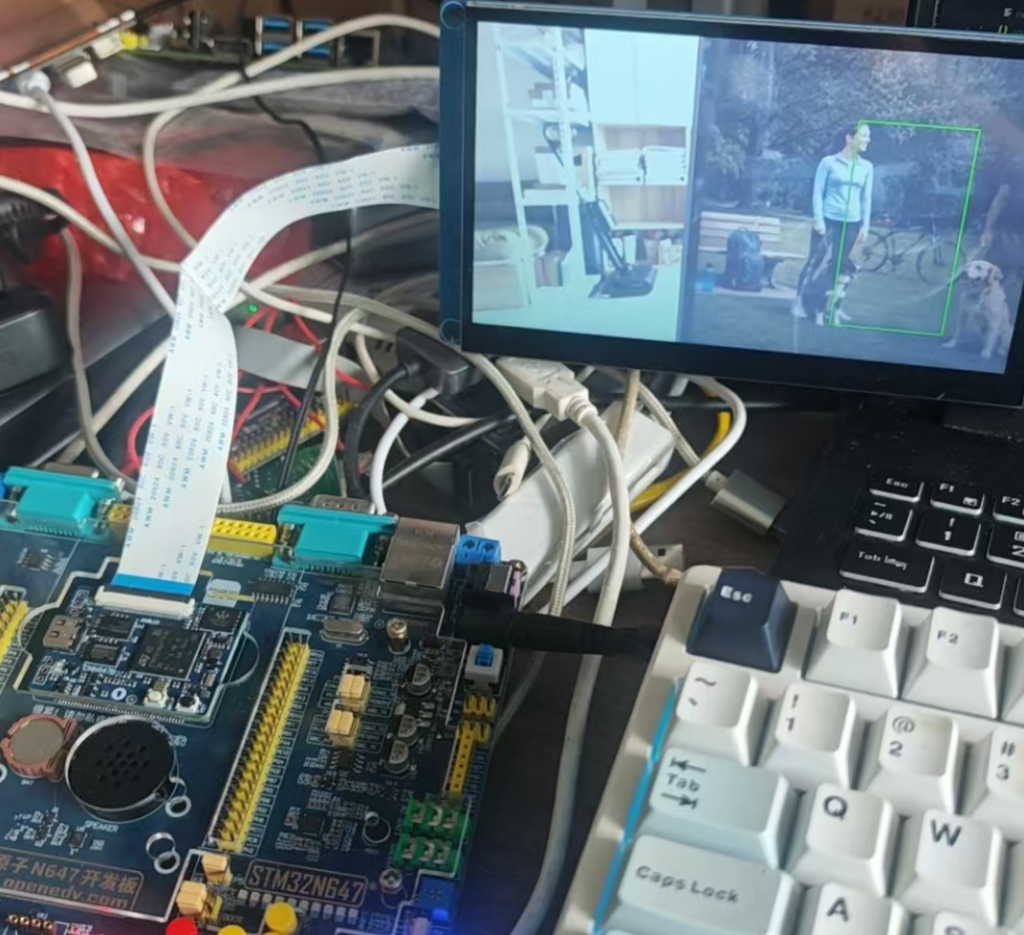
本文仅仅是上手记录,并且丢掉那烦人的CubeIDE(不喜欢Eclipse),可以用CubeCLT来代替,里面包含了CubeIDE除了那个UI外壳的所有东西.
本文也不会依赖正点自己的东西,因为他也没解释文件来源等,属于授人以鱼了,所以我现在就要授人以渔.
用到的几个库.
- 官方文档 https://github.com/STMicroelectronics/STM32N6-GettingStarted-InstanceSegmentation
- 端到端服务库 https://github.com/STMicroelectronics/stm32ai-modelzoo-services
- Modelzoo https://github.com/STMicroelectronics/stm32ai-modelzoo/tree/master/instance_segmentation/yolov8n_seg (我这里用Yolo v8n切割模型)
这里不得不吐槽下,STM32N6的资料分散且很乱,还有闭源边界很模糊的问题.
硬件是正点原子的STM32N647开发板,毕竟官方买不起,32M的片外Flash和32M的片外RAM,但是NPU是高带宽操作,其实也用不到片外RAM的,而且实际拓扑能看到,NPU访问RAM比MCU核心还近.
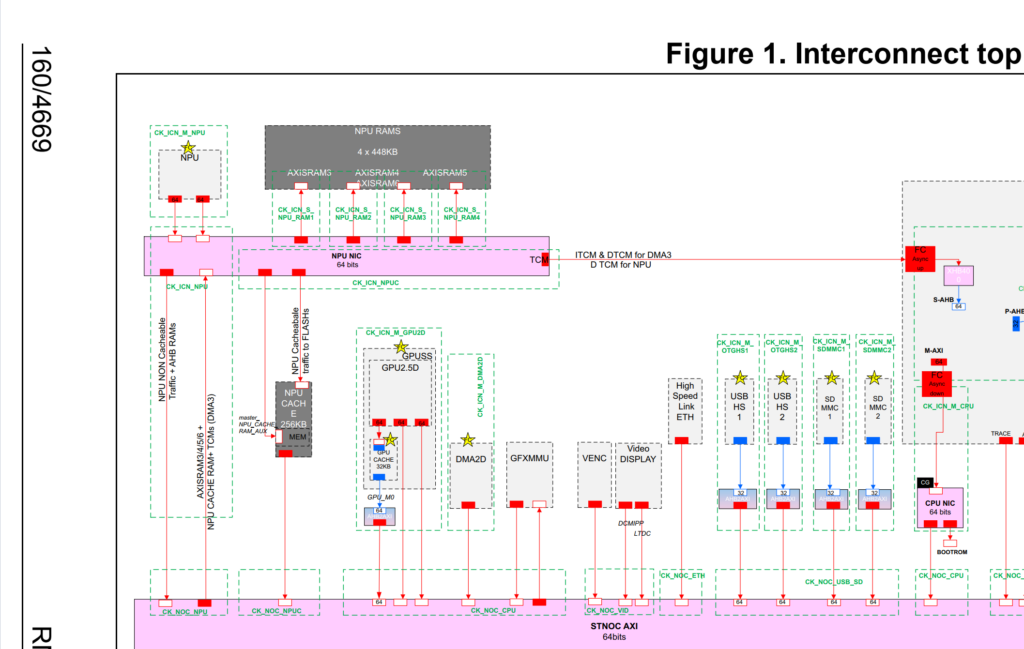
可以理解成3,4,5,6是给NPU专用的,如果不够,还可以借用其他片上SRAM,再考虑片外RAM,我量化时候猜测YOLO v8n是不够的,所以我还借用了AXISRAM2,等下会说到.
第一步是准备一个配置JSON.
{
  "Globals": {},
  "Profiles": {
    "default": {
      "memory_pool": "./my_mpools/stm32n647.mpool",
      "options": "-O3 --all-buffers-info --cache-maintenance --Oauto-sched --native-float --enable-virtual-mem-pools --Omax-ca-pipe 4 --Ocache-opt --Os --enable-epoch-controller"
    }
  }
}
上面的优化Flag不能说和GCC一样,只能说基本没相关性,具体参数要看NPU编译器.
编译器文档 https://stedgeai-dc.st.com/assets/embedded-docs/stneuralart_neural_art_compiler.html
然后创建一个Pool配置.
{
  "params": { "param": [{ "paramname": "max_onchip_sram_size", "value": "1024", "magnitude": "KBYTES" }] },
  "memory": {
    "cacheinfo": [{ "nlines": 512, "linesize": 64, "associativity": 8, "bypass_enable": 1,
      "prop": { "rights": "ACC_WRITE", "throughput": "MID", "latency": "MID", "byteWidth": 8, "freqRatio": 2.50, "read_power": 13.584, "write_power": 12.645 } }],
    "mem_file_prefix": "atonbuf",
    "mempools": [
      { "fname": "AXIFLEXMEM", "name": "flexMEM", "fformat": "FORMAT_RAW", "prop": { "rights": "ACC_WRITE", "throughput": "MID", "latency": "MID", "byteWidth": 8, "freqRatio": 2.50, "read_power": 9.381, "write_power": 8.569 }, "offset": { "value": "0x34000000", "magnitude": "BYTES" }, "size": { "value": "0", "magnitude": "KBYTES" } },
      { "fname": "AXISRAM1", "name": "cpuRAM1", "fformat": "FORMAT_RAW", "prop": { "rights": "ACC_WRITE", "throughput": "MID", "latency": "MID", "byteWidth": 8, "freqRatio": 2.50, "read_power": 16.616, "write_power": 14.522 }, "offset": { "value": "0x34080000", "magnitude": "BYTES" }, "size": { "value": "0", "magnitude": "KBYTES" } },
      { "fname": "AXISRAM2", "name": "cpuRAM2", "fformat": "FORMAT_RAW", "prop": { "rights": "ACC_WRITE", "throughput": "MID", "latency": "MID", "byteWidth": 8, "freqRatio": 2.50, "read_power": 17.324, "write_power": 15.321 }, "offset": { "value": "0x34100000", "magnitude": "BYTES" }, "size": { "value": "1024", "magnitude": "KBYTES" } },
      { "fname": "AXISRAM3", "name": "npuRAM3", "fformat": "FORMAT_RAW", "prop": { "rights": "ACC_WRITE", "throughput": "HIGH", "latency": "LOW", "byteWidth": 8, "freqRatio": 1.25, "read_power": 18.531, "write_power": 16.201 }, "offset": { "value": "0x34200000", "magnitude": "BYTES" }, "size": { "value": "448", "magnitude": "KBYTES" } },
      { "fname": "AXISRAM4", "name": "npuRAM4", "fformat": "FORMAT_RAW", "prop": { "rights": "ACC_WRITE", "throughput": "HIGH", "latency": "LOW", "byteWidth": 8, "freqRatio": 1.25, "read_power": 18.531, "write_power": 16.201 }, "offset": { "value": "0x34270000", "magnitude": "BYTES" }, "size": { "value": "448", "magnitude": "KBYTES" } },
      { "fname": "AXISRAM5", "name": "npuRAM5", "fformat": "FORMAT_RAW", "prop": { "rights": "ACC_WRITE", "throughput": "HIGH", "latency": "LOW", "byteWidth": 8, "freqRatio": 1.25, "read_power": 18.531, "write_power": 16.201 }, "offset": { "value": "0x342e0000", "magnitude": "BYTES" }, "size": { "value": "448", "magnitude": "KBYTES" } },
      { "fname": "AXISRAM6", "name": "npuRAM6", "fformat": "FORMAT_RAW", "prop": { "rights": "ACC_WRITE", "throughput": "HIGH", "latency": "LOW", "byteWidth": 8, "freqRatio": 1.25, "read_power": 19.006, "write_power": 15.790 }, "offset": { "value": "0x34350000", "magnitude": "BYTES" }, "size": { "value": "448", "magnitude": "KBYTES" } },
      { "fname": "xSPI2", "name": "octoFlash", "fformat": "FORMAT_RAW", "prop": { "rights": "ACC_READ", "throughput": "MID", "latency": "HIGH", "byteWidth": 1, "freqRatio": 6.00, "cacheable": "CACHEABLE_ON", "read_power": 110, "write_power": 400.0, "constants_preferred": "true" }, "offset": { "value": "0x71C00000", "magnitude": "BYTES" }, "size": { "value": "4", "magnitude": "MBYTES" } }
    ]
  }
}
解释一下我的配置
| 内存池 | NPU可用容量 | 用途 |
|---|---|---|
| flexMEM | 0 | 不用 |
| AXISRAM1 | 0 | 不用 |
| AXISRAM2 | 1024 KB | NPU RAM不够的补充 |
| AXISRAM3~6 | 4 × 448 KB | NPU 本地高速 RAM |
| xSPI2 Flash | 4 MB | 权重 |
Cache属于照抄,freqRatio数值越大,说明越慢,read_power/write_power说的是访问他的功耗代价,当前我的设置下,模型会这么编译
NPU RAM3~6
    ↓ 不够
AXISRAM2
    ↓ 仍不够
外部内存
按照目录结构存好,如果你说你在Windows?那你还是用Linux执行,毕竟模型训练各种也还是Linux方便.
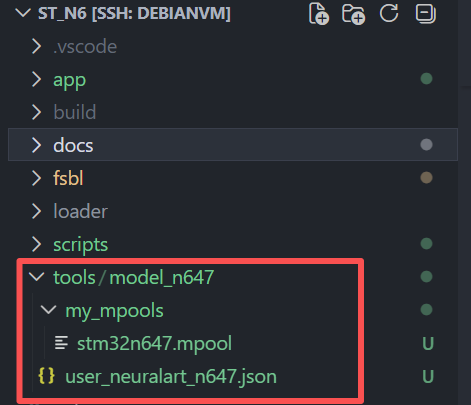
编译模型,因为是相对路径的,所以要切换到对应目录.
export STEDGEAI=/opt/st/STEdgeAI/4.0/Utilities/linux/stedgeai
mkdir -p build/model-official
cd build/model-official
cp -a [你的配置路径,我是tools/model_n647] .
"$STEDGEAI" generate \
  --model /root/stm32n6-ai/official-models/yolov8n_320_quant_pc_ii_seg_coco-st.tflite \
  --target stm32n6 --input-data-type uint8 \
  --st-neural-art default@user_neuralart_n647.json \
  --workspace st_ai_ws --output st_ai_output --with-report
arm-none-eabi-objcopy -I binary st_ai_output/network_atonbuf.xSPI2.raw \
  --change-addresses 0x71C00000 -O ihex network-data.hex
量化整体过程大概是这样的.
量化 TFLite
↓
ST Edge AI 前端导入 + 图优化 + 算子规范化
↓
中间 ONNX
+
量化参数 JSON
↓
AtoNN Neural-ART 编译
↓
算子切分 调度 内存复用 NPU/CPU 划分
↓
Epoch Controller 后处理
↓
C代码 + EC微码 + 外部Flash权重 + 接口文件
实际通过复用,NPURAM已经足够了,并且NPURAM6都没用完.
====================================================================================
Memory usage information  (input/output buffers are included in activations)
   ---------------------------------------------------------------------------------
        flexMEM    [0x34000000 - 0x34000000]:          0  B /          0  B  (  0.00 % used) -- weights:          0  B (  0.00 % used)  activations:          0  B (  0.00 % used)
        cpuRAM1    [0x34080000 - 0x34080000]:          0  B /          0  B  (  0.00 % used) -- weights:          0  B (  0.00 % used)  activations:          0  B (  0.00 % used)
        cpuRAM2    [0x34100000 - 0x34200000]:          0  B /      1.000 MB  (  0.00 % used) -- weights:          0  B (  0.00 % used)  activations:          0  B (  0.00 % used)
        npuRAM3    [0x34200000 - 0x34270000]:    435.938 kB /    448.000 kB  ( 97.31 % used) -- weights:          0  B (  0.00 % used)  activations:    435.938 kB ( 97.31 % used)
        npuRAM4    [0x34270000 - 0x342E0000]:    437.891 kB /    448.000 kB  ( 97.74 % used) -- weights:          0  B (  0.00 % used)  activations:    437.891 kB ( 97.74 % used)
        npuRAM5    [0x342E0000 - 0x34350000]:    440.062 kB /    448.000 kB  ( 98.23 % used) -- weights:          0  B (  0.00 % used)  activations:    440.062 kB ( 98.23 % used)
        npuRAM6    [0x34350000 - 0x343C0000]:    100.000 kB /    448.000 kB  ( 22.32 % used) -- weights:          0  B (  0.00 % used)  activations:    100.000 kB ( 22.32 % used)
        octoFlash  [0x71C00000 - 0x72000000]:      3.355 MB /      4.000 MB  ( 83.87 % used) -- weights:      3.355 MB ( 83.87 % used)  activations:          0  B (  0.00 % used)

Total:                                             4.736 MB                                  -- weights:      3.355 MB                  activations:      1.381 MB
====================================================================================
Used memory ranges
   ---------------------------------------------------------------------------------
        npuRAM3    [0x34200000 - 0x34270000]: 0x34200000-0x3426CFC0
        npuRAM4    [0x34270000 - 0x342E0000]: 0x34270000-0x342DD790
        npuRAM5    [0x342E0000 - 0x34350000]: 0x342E0000-0x3434E040
        npuRAM6    [0x34350000 - 0x343C0000]: 0x34350000-0x34369000
        octoFlash  [0x71C00000 - 0x72000000]: 0x71C00000-0x71F5AD70
算子实现,EC就是走NPU的,Hybird就是涉及CPU的运算,因为有些运算NPU做代价可能更大或者不合适.
+----------------------+--------+--------------+
| epoch ID             |  Type  |   Details    |
+----------------------+--------+--------------+
| epochs    2 -> 57    |   EC   |              |
| epoch_58             | Hybrid | DepthToSpace |
| epoch_59             | Hybrid |    Concat    |
| epochs   60 -> 68    |   EC   |              |
| epoch_69             | Hybrid | DepthToSpace |
| epoch_70             | Hybrid |    Concat    |
| epochs   71 -> 89    |   EC   |              |
| epoch_90             | Hybrid |    Concat    |
| epoch_91             | Hybrid |    Concat    |
| epoch_92             | Hybrid | DepthToSpace |
| epoch_93             | Hybrid |    Concat    |
| epochs   94 -> 113   |   EC   |              |
| epoch_114            | Hybrid |    Concat    |
| epoch_115            | Hybrid |    Concat    |
| epochs  116 -> 131   |   EC   |              |
| epoch_132            | Hybrid |    Concat    |
| <no executed epochs> |   EC   |              |
| epoch_135            | Hybrid |    Slice     |
| epoch_136            | Hybrid |    Slice     |
| epochs  137 -> 137   |   EC   |              |
| epoch_138            | Hybrid |  Transpose   |
| epochs  139 -> 139   |   EC   |              |
| epoch_140            |   SW   |   Softmax    |
| epochs  141 -> 144   |   EC   |              |
| epoch_145            | Hybrid |    Slice     |
| epoch_146            | Hybrid |    Slice     |
| epochs  147 -> 149   |   EC   |              |
| epoch_150            | Hybrid |    Concat    |
| epochs  152 -> 152   |   EC   |              |
资源消耗
 Requested memory size by section - "stm32n6npu" target
 ------------------------------- -------- ----------- ------ -----------
 module                              text      rodata   data         bss
 ------------------------------- -------- ----------- ------ -----------
 EC Blobs                              20     236,416      0           0
 network.o                          1,024      41,359      0           0
 NetworkRuntime1201_CM55_GCC.a     10,952           0      0           0
 stai_network.o                         0           0      0           0
 lib (toolchain)*                       0           0      0           0
 ll atonn runtime                  10,802      18,103    192       1,741
 ------------------------------- -------- ----------- ------ -----------
 RT total**                        22,798     295,878    192       1,741
 ------------------------------- -------- ----------- ------ -----------
 weights                                0   3,517,793      0           0
 activations                            0           0      0   1,447,824
 io                                     0           0      0           0
 ------------------------------- -------- ----------- ------ -----------
 TOTAL                             22,798   3,813,671    192   1,449,565
 ------------------------------- -------- ----------- ------ -----------
 *  toolchain objects (libm/libgcc*)
 ** RT AI runtime objects (kernels+infrastructure)

  Summary - "stm32n6npu" target
  --------------------------------------------------
               FLASH (ro)     %*    RAM (rw)      %
  --------------------------------------------------
  RT total        318,868   8.3%       1,933   0.1%
  --------------------------------------------------
  TOTAL         3,836,661          1,449,757
  --------------------------------------------------
  *  rt/total
实际上NPU RAM是2MB,他没用完,所以哪怕我写多了,他也不是非要用,而是会根据实际情况选择,转换后的network-data.hex (arm-none-eabi-objcopy 转换)放到工程目录.
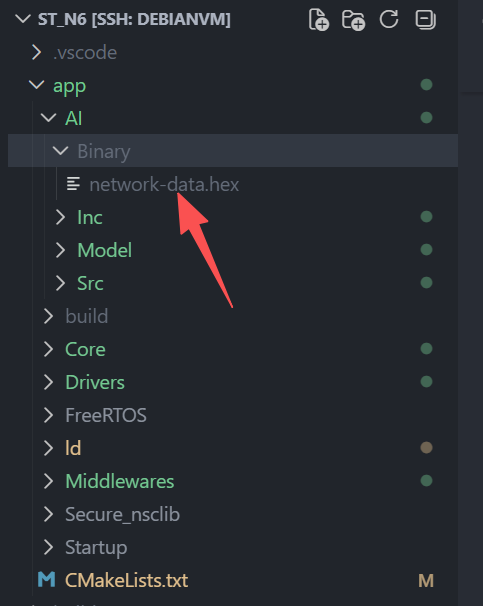
生成的4个文件复制到Model
./build/model-official/st_ai_output/network.c
./build/model-official/st_ai_output/network.h
./build/model-official/st_ai_output/stai_network.c
./build/model-official/st_ai_output/stai_network.h
./build/model-official/st_ai_output/network_ecblobs.h
复制中间件到工程
./STEdgeAI/4.0/Middlewares/ST/AI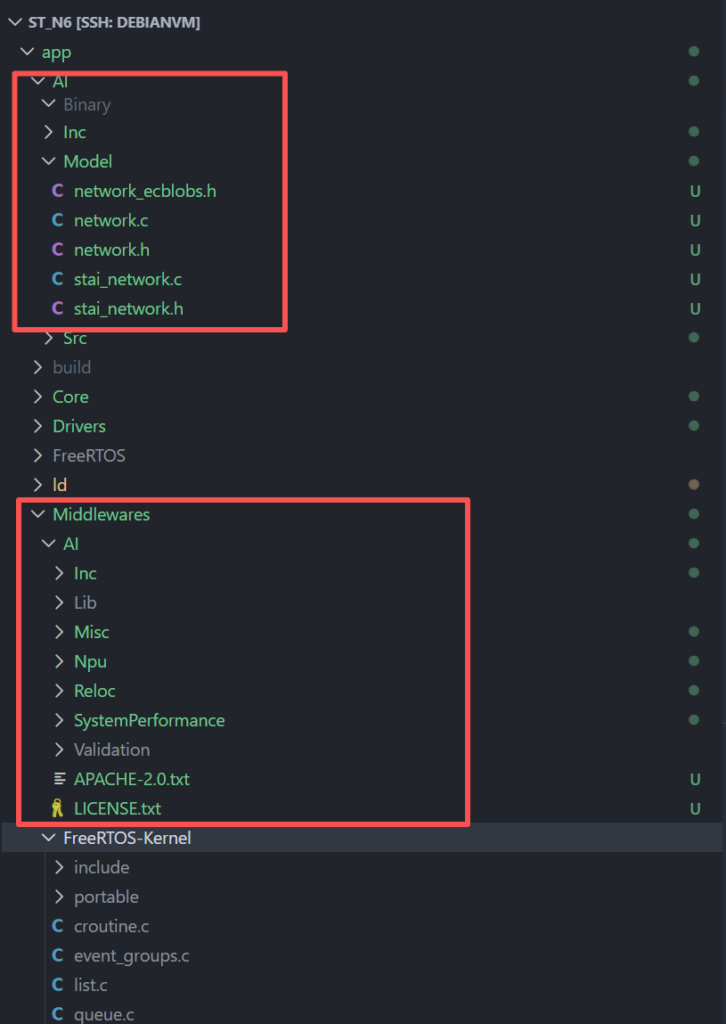
根据网络写app_config.h,你知道他的INPUT SHAPE,摄像头的packed,以及一些你觉得有必要写的内容.
#ifndef __APP_CONFIG_H
#define __APP_CONFIG_H

#include "stm32n6xx_hal.h"
#include "stai_network.h"

/* This project has one 1024x600 RGB framebuffer.  The original 993 demo
 * used two 480/800x480 layers; those values are not valid for this board. */
#define LCD_BG_WIDTH                        1024
#define LCD_BG_HEIGHT                       600
#define LCD_FG_WIDTH                        1024
#define LCD_FG_HEIGHT                       600

#define CAMERA_MIRROR_FLIP                  CMW_MIRRORFLIP_MIRROR

#define NN_WIDTH                            STAI_NETWORK_IN_1_WIDTH
#define NN_HEIGHT                           STAI_NETWORK_IN_1_HEIGHT
/* Model input, independent of the LCD framebuffer size. */
#define NN_FORMAT                           DCMIPP_PIXEL_PACKER_FORMAT_RGB888_YUV444_1
#define NN_BPP                              STAI_NETWORK_IN_1_CHANNEL
#define NN_CLASSES                          80
#define NN_CLASSES_TABLE                    {\
                                                "person",\
                                                "bicycle",\
                                                "car",\
                                                "motorcycle",\
                                                "airplane",\
                                                "bus",\
                                                "train",\
                                                "truck",\
                                                "boat",\
                                                "traffic light",\
                                                "fire hydrant",\
                                                "stop sign",\
                                                "parking meter",\
                                                "bench",\
                                                "bird",\
                                                "cat",\
                                                "dog",\
                                                "horse",\
                                                "sheep",\
                                                "cow",\
                                                "elephant",\
                                                "bear",\
                                                "zebra",\
                                                "giraffe",\
                                                "backpack",\
                                                "umbrella",\
                                                "handbag",\
                                                "tie",\
                                                "suitcase",\
                                                "frisbee",\
                                                "skis",\
                                                "snowboard",\
                                                "sports ball",\
                                                "kite",\
                                                "baseball bat",\
                                                "baseball glove",\
                                                "skateboard",\
                                                "surfboard",\
                                                "tennis racket",\
                                                "bottle",\
                                                "wine glass",\
                                                "cup",\
                                                "fork",\
                                                "knife",\
                                                "spoon",\
                                                "bowl",\
                                                "banana",\
                                                "apple",\
                                                "sandwich",\
                                                "orange",\
                                                "broccoli",\
                                                "carrot",\
                                                "hot dog",\
                                                "pizza",\
                                                "donut",\
                                                "cake",\
                                                "chair",\
                                                "couch",\
                                                "potted plant",\
                                                "bed",\
                                                "dining table",\
                                                "toilet",\
                                                "tv",\
                                                "laptop",\
                                                "mouse",\
                                                "remote",\
                                                "keyboard",\
                                                "cell phone",\
                                                "microwave",\
                                                "oven",\
                                                "toaster",\
                                                "sink",\
                                                "refrigerator",\
                                                "book",\
                                                "clock",\
                                                "vase",\
                                                "scissors",\
                                                "teddy bear",\
                                                "hair drier",\
                                                "toothbrush"\
                                            }
#define NN_OUTPUT_NUMBER                    STAI_NETWORK_OUT_NUM

#define POSTPROCESS_TYPE                    POSTPROCESS_ISEG_YOLO_V8_UI
#define AI_YOLOV8_SEG_PP_TOTAL_BOXES        STAI_NETWORK_OUT_1_CHANNEL
#define AI_YOLOV8_SEG_PP_NB_CLASSES         NN_CLASSES
#define AI_YOLOV8_SEG_PP_MASK_NB            STAI_NETWORK_OUT_2_CHANNEL
#define AI_YOLOV8_SEG_PP_MASK_SIZE          STAI_NETWORK_OUT_2_HEIGHT
#define AI_YOLOV8_SEG_PP_CONF_THRESHOLD     0.5f
#define AI_YOLOV8_SEG_PP_IOU_THRESHOLD      0.4f
#define AI_YOLOV8_SEG_PP_MAX_BOXES_LIMIT    10

#endif
重点讲下最后的参数怎么来的
- POSTPROCESS_TYPE = POSTPROCESS_ISEG_YOLO_V8_UI 选择ST的YOLOv8 实例分割.
- AI_YOLOV8_SEG_PP_TOTAL_BOXES = 40×40 + 20×20 + 10×10 = 2100 个候选,三个尺度的网格数
- AI_YOLOV8_SEG_PP_NB_CLASSES = 训练时候的分类数
- AI_YOLOV8_SEG_PP_MASK_NB = 32 模型结构 NB_CLASS x NB_CLASS x 32
- AI_YOLOV8_SEG_PP_MASK_SIZE = mask prototype 的空间尺寸,来自第二输出的80 x 80 x 32,320模型通常是输入尺寸除4,256模型是64.
- AI_YOLOV8_SEG_PP_CONF_THRESHOLD = 0.5 低于0.5置信丢弃
- AI_YOLOV8_SEG_PP_IOU_THRESHOLD = 0.4 同框去除阈值,就是同一个位置识别两个东西,只保留高的,这个标表示重叠程度.
- AI_YOLOV8_SEG_PP_MAX_BOXES_LIMIT = 10 最多画10个目标
复制预处理层的文件 (STM32N6-GettingStarted-PoseEstimation/Middlewares/ai-postprocessing-wrapper)
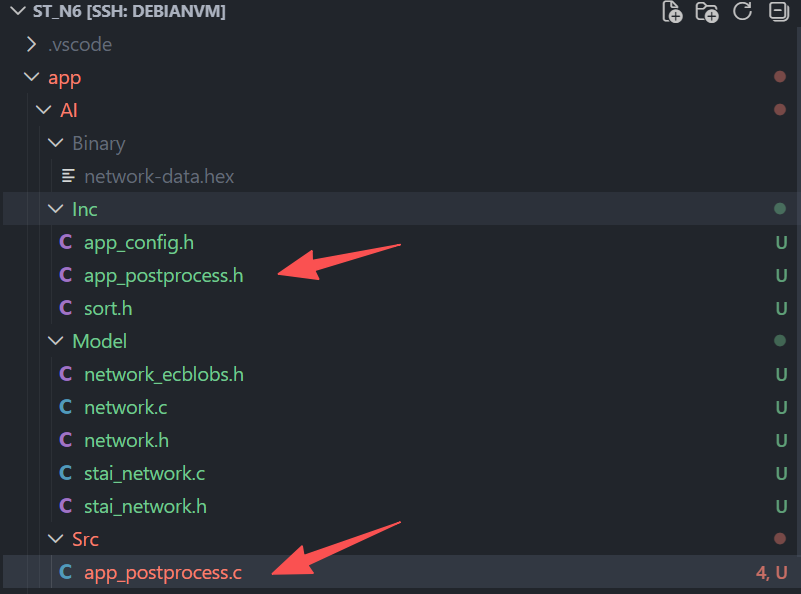
最后唯一自己写的代码就是应用代码了.
#include "ai_instance_segmentation.h"

#include "FreeRTOS.h"
#include "task.h"
#include "serial_console.h"
#include "stm32n6xx_ll_bus.h"
#include "npu_cache.h"
#include "app_postprocess.h"
#include "app_config.h"
#include "stai_network.h"
#include <stdio.h>
#include <string.h>

#define AI_INPUT_BYTES (NN_WIDTH * NN_HEIGHT * NN_BPP)
#define AI_MAX_BOXES AI_YOLOV8_SEG_PP_MAX_BOXES_LIMIT

STAI_NETWORK_CONTEXT_DECLARE(s_network_context, STAI_NETWORK_CONTEXT_SIZE);
static TaskHandle_t s_ai_task;
static volatile uint32_t s_ai_buffer_busy;
static uint8_t *s_input;
static iseg_pp_outBuffer_t s_boxes[AI_MAX_BOXES];
static volatile uint32_t s_box_count;
static const char *const s_classes[NN_CLASSES] = NN_CLASSES_TABLE;

static void ai_log(const char *s) { (void)serial_console_write(s, (unsigned short)strlen(s)); }

uint8_t *AIInstanceSegmentation_GetInputBuffer(void)
{
  uint8_t *buffer = NULL;
  taskENTER_CRITICAL();
  if ((s_ai_task != NULL) && (s_ai_buffer_busy == 0U))
  {
    s_ai_buffer_busy = 1U;
    buffer = s_input;
  }
  taskEXIT_CRITICAL();
  return buffer;
}

void AIInstanceSegmentation_SubmitFrame(void)
{
  if (s_ai_task != NULL) xTaskNotifyGive(s_ai_task);
}

void AIInstanceSegmentation_DrawDetections(uint16_t *fb, uint32_t width, uint32_t height)
{
  iseg_pp_outBuffer_t boxes[AI_MAX_BOXES];
  uint32_t count;
  taskENTER_CRITICAL();
  count = s_box_count;
  memcpy(boxes, s_boxes, count * sizeof(boxes[0]));
  taskEXIT_CRITICAL();
  for (uint32_t i = 0; i < count; ++i)
  {
    int32_t x0 = (int32_t)((boxes[i].x_center - boxes[i].width * .5f) * width);
    int32_t y0 = (int32_t)((1.0f - boxes[i].y_center - boxes[i].height * .5f) * height);
    int32_t x1 = (int32_t)((boxes[i].x_center + boxes[i].width * .5f) * width);
    int32_t y1 = (int32_t)((1.0f - boxes[i].y_center + boxes[i].height * .5f) * height);
    if (x0 < 0) x0 = 0;
    if (y0 < 0) y0 = 0;
    if (x1 >= (int32_t)width) x1 = (int32_t)width - 1;
    if (y1 >= (int32_t)height) y1 = (int32_t)height - 1;
    if ((x1 <= x0) || (y1 <= y0)) continue;
    for (int32_t t = 0; t < 3; ++t)
    {
      for (int32_t x = x0; x <= x1; ++x)
      { fb[(y0 + t) * width + x] = 0x07e0U; fb[(y1 - t) * width + x] = 0x07e0U; }
      for (int32_t y = y0; y <= y1; ++y)
      { fb[y * width + x0 + t] = 0x07e0U; fb[y * width + x1 - t] = 0x07e0U; }
    }
  }
}

static void ai_npu_init(void)
{
  LL_MEM_EnableClock(LL_MEM_AXISRAM3 | LL_MEM_AXISRAM4 | LL_MEM_AXISRAM5 | LL_MEM_AXISRAM6);
  CLEAR_BIT(RAMCFG_SRAM3_AXI->CR, RAMCFG_CR_SRAMSD);
  CLEAR_BIT(RAMCFG_SRAM4_AXI->CR, RAMCFG_CR_SRAMSD);
  CLEAR_BIT(RAMCFG_SRAM5_AXI->CR, RAMCFG_CR_SRAMSD);
  CLEAR_BIT(RAMCFG_SRAM6_AXI->CR, RAMCFG_CR_SRAMSD);
  LL_AHB5_GRP1_EnableClock(LL_AHB5_GRP1_PERIPH_NPU);
  LL_AHB5_GRP1_ForceReset(LL_AHB5_GRP1_PERIPH_NPU);
  LL_AHB5_GRP1_ReleaseReset(LL_AHB5_GRP1_PERIPH_NPU);
  LL_MEM_EnableClock(LL_MEM_CACHEAXIRAM);
  LL_AHB5_GRP1_EnableClock(LL_AHB5_GRP1_PERIPH_CACHEAXI);
  LL_AHB5_GRP1_ForceReset(LL_AHB5_GRP1_PERIPH_CACHEAXI);
  LL_AHB5_GRP1_ReleaseReset(LL_AHB5_GRP1_PERIPH_CACHEAXI);
  npu_cache_enable();
}

void AIInstanceSegmentationTask(void *argument)
{
  char line[128];
  stai_network_info info;
  stai_ptr inputs[1] = {0};
  stai_ptr outputs[STAI_NETWORK_OUT_NUM] = {0};
  stai_size n_inputs = 1;
  stai_size n_outputs = STAI_NETWORK_OUT_NUM;
  uint32_t lengths[STAI_NETWORK_OUT_NUM];
  iseg_yolov8_pp_static_param_t pp;
  (void)argument;

  s_ai_task = xTaskGetCurrentTaskHandle();
  ai_npu_init();
  configASSERT(stai_runtime_init() == STAI_SUCCESS);
  configASSERT(stai_network_init(s_network_context) == STAI_SUCCESS);
  configASSERT(stai_network_get_info(s_network_context, &info) == STAI_SUCCESS);
  configASSERT((info.n_inputs == 1U) && (info.n_outputs == STAI_NETWORK_OUT_NUM));
  configASSERT(stai_network_get_inputs(s_network_context, inputs, &n_inputs) == STAI_SUCCESS);
  configASSERT(stai_network_get_outputs(s_network_context, outputs, &n_outputs) == STAI_SUCCESS);
  configASSERT((n_inputs == 1U) && (n_outputs == STAI_NETWORK_OUT_NUM));
  s_input = (uint8_t *)inputs[0];
  configASSERT(info.inputs[0].size_bytes == AI_INPUT_BYTES);
  for (uint32_t i = 0; i < STAI_NETWORK_OUT_NUM; ++i) lengths[i] = info.outputs[i].size_bytes;
  configASSERT(app_postprocess_init(&pp, &info) == AI_ISEG_POSTPROCESS_ERROR_NO);
  ai_log("ai: ready yolov8-seg / STEdgeAI 4\r\n");

  for (;;)
  {
    (void)ulTaskNotifyTake(pdTRUE, portMAX_DELAY);
    SCB_InvalidateDCache_by_Addr((uint32_t *)s_input, AI_INPUT_BYTES);
    configASSERT(stai_network_run(s_network_context, STAI_MODE_SYNC) == STAI_SUCCESS);
    for (uint32_t i = 0; i < STAI_NETWORK_OUT_NUM; ++i)
      SCB_InvalidateDCache_by_Addr((uint32_t *)outputs[i], lengths[i]);
    iseg_pp_out_t result = {0};
    int32_t err = app_postprocess_run((void **)outputs, STAI_NETWORK_OUT_NUM, &result, &pp);
    taskENTER_CRITICAL();
    s_box_count = ((err == 0) && (result.nb_detect > 0))
      ? ((result.nb_detect > AI_MAX_BOXES) ? AI_MAX_BOXES : (uint32_t)result.nb_detect) : 0U;
    memcpy(s_boxes, result.pOutBuff, s_box_count * sizeof(s_boxes[0]));
    taskEXIT_CRITICAL();
    if (s_box_count == 0U)
    { (void)snprintf(line, sizeof(line), "ai: objects=0 pp=%ld\r\n", (long)err); ai_log(line); }
    else for (uint32_t i = 0; i < s_box_count; ++i)
    {
      uint32_t cls = (uint32_t)s_boxes[i].class_index;
      uint32_t confidence = (uint32_t)(s_boxes[i].conf * 1000.0f + 0.5f);
      (void)snprintf(line, sizeof(line), "ai: %s %lu.%03lu\r\n",
        (cls < NN_CLASSES) ? s_classes[cls] : "unknown",
        (unsigned long)(confidence / 1000U), (unsigned long)(confidence % 1000U));
      ai_log(line);
    }
    taskENTER_CRITICAL();
    s_ai_buffer_busy = 0U;
    taskEXIT_CRITICAL();
  }
}
用CubeCLT的工具一路下载就行,Loader没必要自己做,直接用原子的就行,他只是个临时媒介.
ROOT="$(CDPATH= cd -- "$(dirname -- "$0")/.." && pwd)"
CUBECLT_ROOT="${CUBECLT_ROOT:-/opt/st/stm32cubeclt_1.22.0}"
APP_BIN="${APP_BIN:-$ROOT/build/app/app.bin}"
MODEL_HEX="${MODEL_HEX:-$ROOT/app/AI/Binary/network-data.hex}"
PROGRAMMER="$CUBECLT_ROOT/STM32CubeProgrammer/bin/STM32_Programmer_CLI"

"$PROGRAMMER" -c port=SWD mode=UR reset=HWrst freq=4000 \
  -el "$ROOT/loader/ExtMemLoader.stldr" \
  -d "$APP_BIN" 0x70010000 -v
"$PROGRAMMER" -c port=SWD mode=UR reset=HWrst freq=4000 \
  -el "$ROOT/loader/ExtMemLoader.stldr" \
  -d "$MODEL_HEX" -v
我用的是IMX415,对于STM32N6,这个摄像头未超规格.